A space of your own.
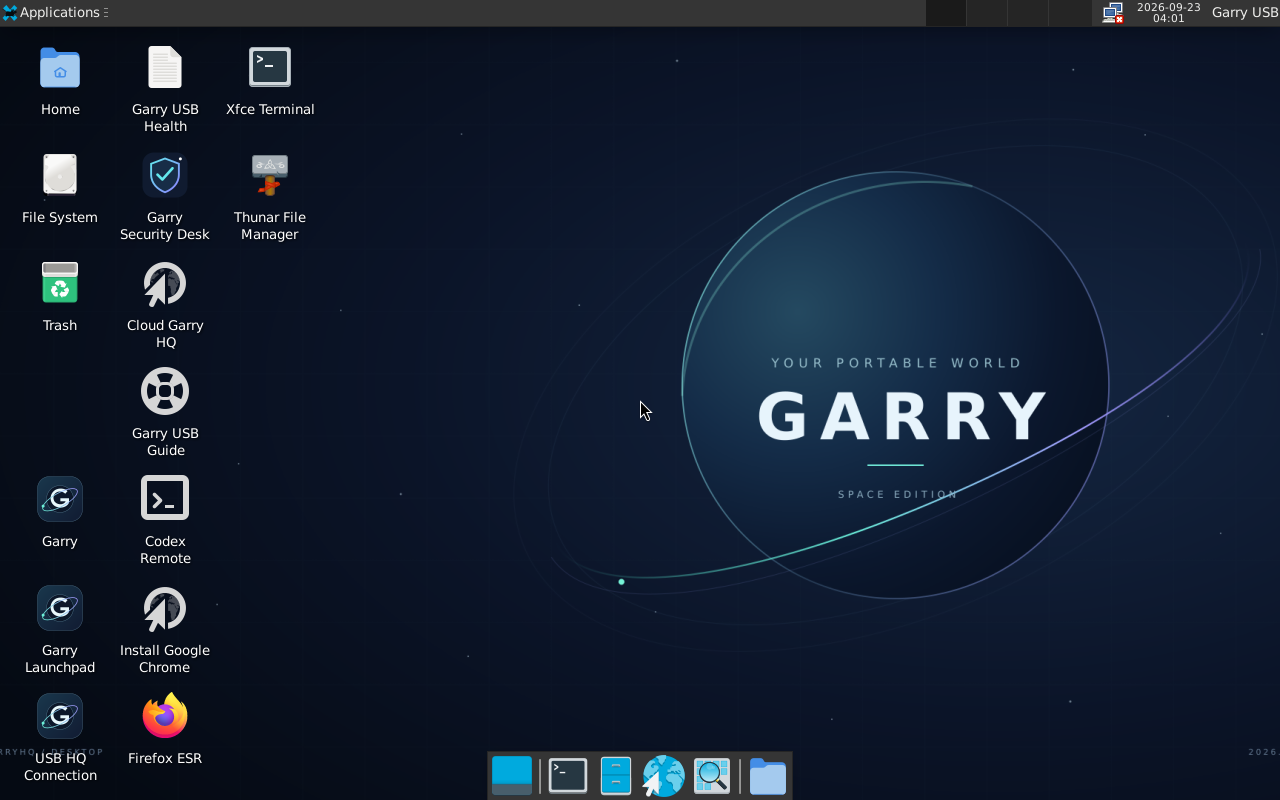
Garry boot menus, a space wallpaper, a welcome launchpad and a matching dark workspace. Firefox, files, terminal and everyday Linux apps are ready. Chrome has its own official installer shortcut.
 GARRY / USB
SPACE EDITION · 2026.09.22
Start a compatible PC in your own Garry desktop. Bring your browser, files and workspace along—with a new view of what comes next.
2.28 GB · Intel / AMD 64-bit PCs · 32 GB USB recommended
Normal BIOS/UEFI startup, local workspace, live-file checksums and saved work across reboot passed in isolated virtual machines. This does not verify a particular physical USB.
MORE AT HOME. MORE CAPABLE.
Garry boot menus, a space wallpaper, a welcome launchpad and a matching dark workspace. Firefox, files, terminal and everyday Linux apps are ready. Chrome has its own official installer shortcut.
USB Health shows storage, available memory and readable error summaries. Its optional live-file check compares the running image against its checksum manifest—without formatting or repairing anything.
Security Desk brings together Nmap, Wireshark, DNS and TLS tools, and local system auditing. Choose a tool yourself for a system you own or have permission to test. No background scanning.
OPTIONAL / YOUR USB IN GARRYHQ
Open USB Devices in GarryHQ, sign in and create a pairing code. Enter that one-time code in the desktop's USB HQ Connection dialog after writable persistence is working. Each USB gets its own private identity; no account credentials are included in this download.
Pairing, Wi-Fi and controls ↗See device status and health, request a read-only health or media check, pause reporting, revoke a device, or find the latest image to download. Maintenance results arrive when the paired USB is online.
Join your trusted Wi-Fi once inside Linux. Full-system persistence can save that network for later boots. Location shown in HQ is an approximate city from the internet connection's IP—not GPS, and may be inaccurate.
The connection shares limited health data, not your files or passwords. It does not provide arbitrary remote commands or automatically install updates.
INSIDE SPACE EDITION
OPTIONAL / NATIVE CODEX REMOTE
The included official Codex CLI has a Codex Remote launcher. After you sign in and enable it, the native daemon can start on later boots and reconnect while the PC is awake and online. No login or pairing identity is bundled in the ISO.
Setup and controls ↗Linux phone pairing is experimental and unverified. Official mobile setup currently uses the Mac/Windows desktop app and does not support setup from the CLI. The experimental CLI pairing command is included for account-level testing; a running daemon is not proof your phone can connect.
This USB is a separate host. It does not move your existing chats or replace the separate Cloud GarryHQ connection.
Get Space Edition and check its SHA-256. Opening the ISO in Windows shows a virtual DVD; that alone does not prepare a USB.
Use Rufus, select the correct spare drive and reserve at least 8 GB for persistence. Writing the image erases that selected USB.
Choose the USB in your PC's boot menu, then Garry Desktop — start normally. Keep the USB connected until the computer shuts down.
YOUR WORKSPACE, CLEARLY DEFINED
This edition improves the interface and desktop tools. It does not upgrade the local model's intelligence. The optional local model remains Qwen3 4B, downloaded separately after persistent storage is working. Tasks and notes work without it.
Cloud Garry is a separate sign-in at GarryHQ. Cloud accounts, chat history, hotel access and remote-control permissions are not bundled on this USB. The local chat model does not automatically operate the security tools.
CHOOSE YOUR EDITION
Debian 13 with XFCE, the space theme, USB Health and manual security tools. Prepare a USB and restart your PC into it.
Download Space ISO ↓Extract the whole GarryUSB folder, then open Start Garry.exe for the earlier local workspace. This ZIP does not make a bootable USB.
Download Windows ZIP ↓The earlier Debian desktop remains available with its original release report and checksum. It does not include the Space Edition theme or the new diagnostic tools.
UPDATE / SEPTEMBER 23
Check each Windows account's settings, automatic login, disk protection and remote access. Review private reports locally. The USB maintenance kit adds visible boot status and reversible recovery choices.
Security & recovery downloads →
The maintenance kit is separate from the full ISO. Physical USB installation and startup still need verification.